
PokePath TD Save Data Guide: Stop Losing Your Progress Today
There is nothing worse than grinding for hours to get a Level 100 Ditto or finally beating Route 2-3, only to refresh your browser and see your progress wiped.
If you are playing PokePath TD on a web browser (Chrome, Safari, Edge) or mobile device, you need to understand how the saving system works. It is not a cloud save, and it does not save instantly.
This guide explains why players lose data and the #1 community-discovered trick to ensure your save file is actually secure.
Why Did My Save Disappear? (The Mechanics)
First, you need to understand how PokePath TD saves data.
- Local Storage: The game saves your progress in your Browser Cache (Local Storage). It does not store data on a game server.
- The Danger: If you clear your browser history/cache, use "Incognito Mode," or if your browser (especially on iOS/iPhone) aggressively frees up memory, your save will be deleted forever.
But the most common reason players lose progress isn't clearing cache—it's exporting an old save.
The "Switch Map" Trick: How to Force Autosave
According to veteran players in the Discord community, the game does not save the very second you finish a wave or buy an egg.
The Golden Rule:
"Switch maps first. This is when the game autosaves."
If you finish a wave and immediately click "Export Save," you might be exporting an old version of your data.
The Correct Saving Routine:
- Finish your current wave or farming session.
- Click "Map" (W) and load into a different Route (e.g., go from 1-1 to 1-2).
- This action forces the game to write data to the memory.
- Now you can safely go to Settings -> Export Data.
How to Backup Your Data (The Right Way)
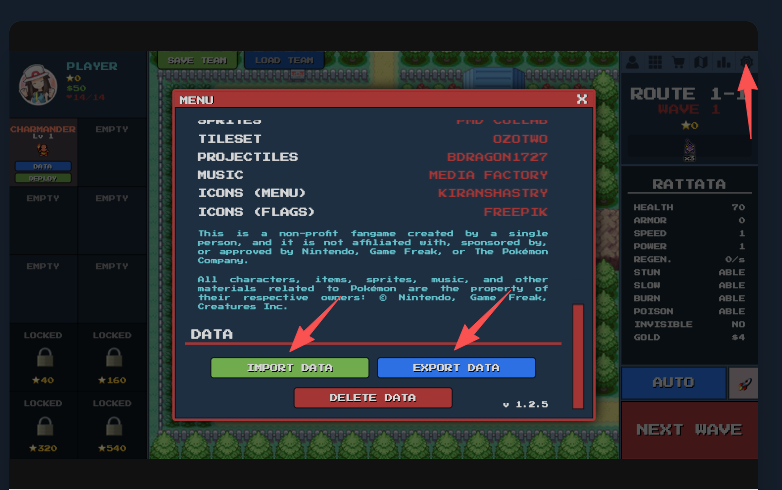
Do not rely on the browser's autosave alone. You must manually back up your data.
Step 1: Exporting
- Follow the "Switch Map" trick above.
- Go to Settings (Gear Icon).
- Scroll down to "Export Data".
- Important: Do NOT just try to copy the text code if it's extremely long. Many browsers/devices have a clipboard limit, and pasting it will result in an "Undefined" or broken save.
- Click "Download" to save a
.txtfile to your computer or phone. This is the safest method.
Step 2: Importing
- Go to Settings -> Import Data.
- Open your
.txtfile, copy the entire string, and paste it. - Click Import. The game should reload with your progress.
Common Issues & Fixes
"I play on iPhone/iOS and my save wipes on refresh"
This is a known issue with iOS Safari. Apple devices aggressively clear the cache of web pages to save battery and RAM.
- The Fix: You cannot "fix" Safari, but you can prevent data loss. You must export your save string to a Notes app or download the
.txtfile every single time you finish playing. Do not trust the browser to keep it open in the background.
"I pasted my code but it says Error/Undefined"
- The Cause: You likely tried to copy a massive save string (late-game saves are huge) and your clipboard cut it off.
- The Fix: Use the Download .txt button instead of copying the text directly.
"Can I move my save from Browser to the Download Version?"
Yes! In fact, this is highly recommended. The downloadable PC version (Windows/Linux) is more stable and doesn't have cache clearing issues.
- Export your save from the Browser.
- Download the game from the official page.
- Open the PC version -> Settings -> Import Data.
- Paste your code.
Frequently Asked Questions (FAQ)
Does PokePath TD save to the cloud?
No. Your save exists only on your current device and browser. If you switch from Chrome to Edge, or from Mobile to PC, you must manually Export and Import your save data.
I cleared my browser cache, can I get my save back?
Unfortunately, no. Since the save is stored in the browser's local cache, clearing it permanently deletes the file. This is why manually downloading your save file is essential.
When should I save my game?
We recommend exporting your save:
- After catching a rare Pokemon (like Ditto).
- After beating a major Boss (Articuno, Zapdos, Suicune).
- Before closing the browser tab.
Found this guide helpful? Bookmark this page and check out our Best Team Guide or Pokemon database to crush Wave 100!